Tariff setup
What tariff setup does
Tariff setup tells the app what you pay for electricity, so it can calculate real running costs and shift your heating into cheaper periods automatically. You find it in the app under More, then Tariff.
Why your tariff matters
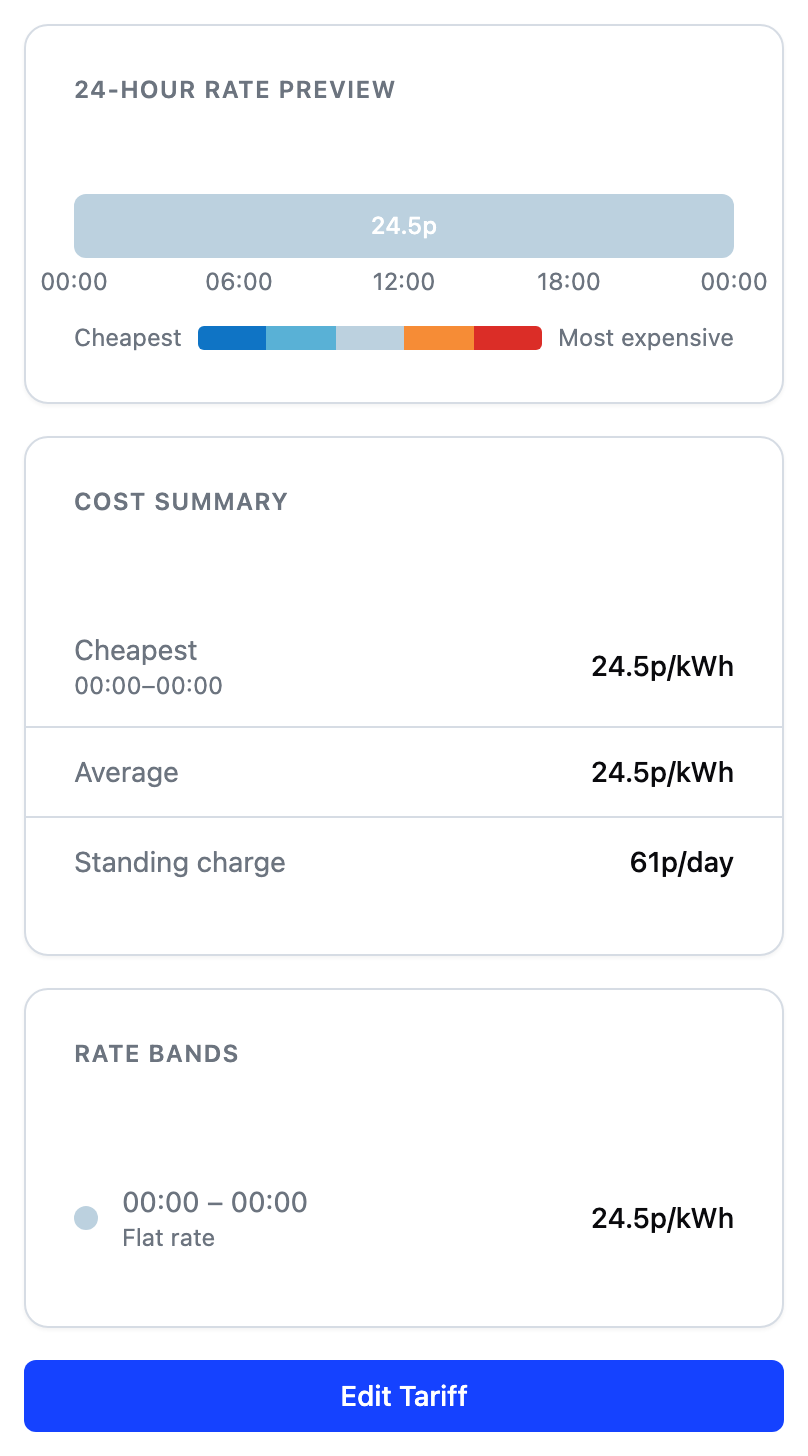
Your tariff is the price plan you have with your energy provider. It has two parts: a unit rate, which is the price per kilowatt hour (kWh), and a standing charge, which is a fixed daily fee. Some tariffs charge one rate all day. Others, called time-of-use tariffs, charge different rates at different times, such as a cheaper rate overnight.
The app uses your tariff for two things:
- Real costs. It calculates what running your device actually costs, so the figures across the app reflect your real prices.
- Cheaper heating. When your goal allows it, the app shifts heating into the cheaper parts of the day. This is where most of the savings come from.
You can find your tariff details on your electricity bill, in your energy provider's app, or by asking their support team. You need the unit rate for each time period and the daily standing charge.
If your tariff has cheaper periods, or you can switch to one that does, a time-of-use or dynamic tariff usually pays off well with a smart device. The app heats when prices are low without you having to think about it, so the bigger the gap between cheap and peak hours, the more it can save. The tariff screen, shown above, summarises your current rates across the day.
Setting up rate bands
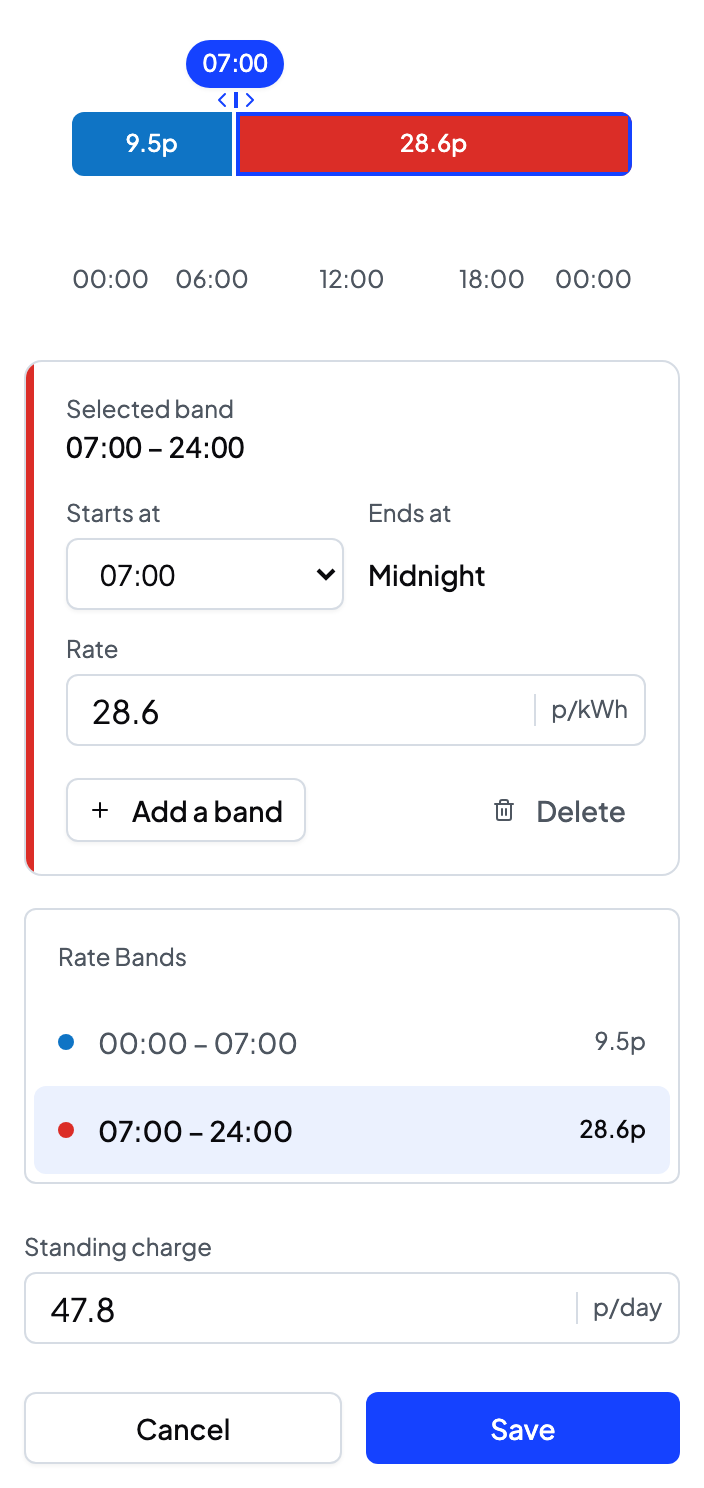
You enter your tariff as rate bands. A band is a stretch of the day with one price. The 24-hour timeline shows every band. Tap a band to select it, then edit its times and rate below.
- A flat rate tariff needs just one band covering the whole day.
- A time-of-use tariff needs a band for each price period, up to 48 in a day.
- Band times are set in 30-minute steps.
For example, a typical two-rate tariff is one band from 00:00 to 07:00 at the cheap overnight rate, and a second band from 07:00 to 24:00 at the day rate.
What you are really editing is the boundary between two bands. A boundary is the moment the price changes. One band's end and the next band's start are the same boundary, so you can set it from either side. Bands therefore always join end to end, with no gaps and no overlaps, because every minute of the day needs a price:
- Drag a boundary's handle on the timeline, or pick a time from Starts at or Ends at. Both move the same join.
- The day begins and ends at midnight, and those two edges do not move. They show as Midnight rather than as a time.
- Add a band to divide the selected one, or the longest band in the day when the selected one has no room to spare. The new band inherits the price it came from, so adding one costs you nothing until you change it.
- Delete a band to remove a price change. Its hours go to a neighbour, and the button tells you which one before you press it.
- If a change would swallow a band whole, the app says so first and offers an undo afterwards.
Entering rates
Each band needs a unit rate: the price per kWh for that time of day. Copy each rate from your bill or your provider's app. Zero is valid, for example for a free overnight period.
If you leave a rate empty and move on, the field turns red and says so. Save stays available: press it with a rate missing and it takes you to the field that is holding you up, rather than leaving you to find it among your bands.
The standing charge
The standing charge is the fixed daily amount your supplier bills regardless of use. Enter it from your bill. A negative value is allowed, which suits some export tariffs.
What saving your tariff does
Saving applies the new rates from the moment you save them. Anything already recorded keeps the price that applied at the time, so today's earlier costs do not change. The app then uses the new rates everywhere costs appear:
- The weekly energy cost card.
- Boost cost estimates.
- Schedule cost estimates.
If the tariff was changed on another device while you were editing, the app tells you and reloads the latest version so you can re-apply your change.
Frequently asked questions
Why can I not create a gap between bands?
Every minute of the day needs a price for costs to be calculated, so the editor keeps bands joined. A gap is not something the editor can express. To remove a band, delete it and its neighbour absorbs the time.
Why can I not change when the first band starts or the last band ends?
Those two are the edges of the day, not joins between bands, so the day always runs from 00:00 to 24:00 and is always fully covered. Every boundary in between does move, and you can set it from either of the bands it separates.
My tariff has many price changes a day. What do I do?
Add a band for each price change your tariff has. The editor holds up to 48 bands a day, one for every half hour, so even a half-hourly tariff fits.
Do I need to add a tariff at all?
Your device still works without one. Without a tariff, your costs cannot be shown and the Savings and Balanced goals have no price signal to plan with. Setting up your tariff unlocks both.