Dashboard
What the dashboard shows
The dashboard is the app's main screen, the first thing you see after signing in. It has two main parts: the hero card with your live reading and status, and the carousel of swipeable cards below it. The rest of the app is one tap away on the bottom navigation, or the sidebar on larger screens.
Reading the dashboard
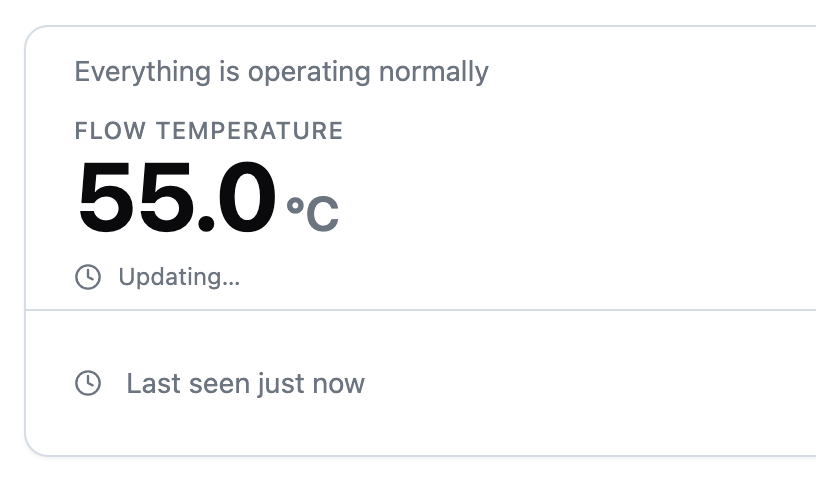
The hero card is the main reading on the dashboard. It has three parts:
- The reading. Shows your device's headline reading, with its name above and its unit beside it, and a short status line underneath.
- The up-next row. Tells you what the device plans to do next: the next heating window, the time remaining on a boost, or a note that away is active. Where your device says which function a heating window serves, the row names it, so you can tell your radiators from your hot water.
- The footer. Shows when the device last reported in and which goal is active.
Which reading leads is chosen by the manufacturer rather than by the app, so it differs by device. A heat pump commonly leads with its flow temperature, and a hot-water store with its tank temperature. Where the manufacturer lists more than one, the rest appear in a row beneath the main figure, in the order they set.
When your device is offline
Offline means the app cannot reach your device. The status badge switches to Offline and figures stay at their last known values.
Goal, Boost and Away stay usable while offline. A change you make is held and applies once the device reconnects. The dashboard shows a note that it is waiting, and the note clears when your device confirms the change.
When a reading is missing
A reading your device has not sent shows as a dash rather than a number, so an absent value is never mistaken for a real one. A genuine zero still shows as zero.
If your device reports no headline reading at all, the hero shows a dash in place of the figure. The rest of the card, including status and the goal pill, works as normal.
Frequently asked questions
Why does the energy cost card say there is no cost data?
Cost is calculated from your device's power readings and your tariff. Set up a tariff first, then allow a little time for readings to arrive.
Why are the boost and away buttons greyed out?
Boost is unavailable while away is on, because away pauses heating. Turn away off first. An offline device does not grey out either button: a change you make is held and applies once your device reconnects.
Why does my dashboard show a different reading from someone else's?
The headline reading is the one your device's manufacturer put first, so it varies by model. A heat pump commonly leads with flow temperature and a hot-water store with tank temperature. The name above the figure always tells you which reading you are looking at.